
Standard Laptop
Monday, June 15, 2009Notebooks are more multiple-purpose computers in a form factor of about ten inches and up. Notebooks can create content and handle heavy multi-tasking loads with many applications running at once. They can view, create, and edit high-definition video content and run intensive programs like computer aided engineering and mathematical modeling.
Subnotebook
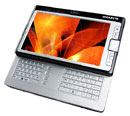
Subnotebooks are usually smaller and lighter than standard laptop not designed for fast speeds but more for power efficiency,weighing 0.8 and 2 kg;battery more than10 hours.To achieve the size and weight reduction subnotebook use small screen (down to 6.4"),few ports, expensive components.Even Omit DVD or CD dirve.
If you are thinking about getting a subnotebook, be sure to ask yourself three questions:
Do I need only basic computing tasks such as web browsing, email, word processing, spreadsheets and basic photo editing?
Do I need high battery time,more than 10 hours?
Am I willing to sacrifice features for portability over a budget laptop?
If the answer to these questions is yes, then a subnotebook might be a computing item to consider.
A subnotebook, also called an ultraportable by some vendors, is a laptop designed and marketed with an emphasis on portability (small size, low weight and long battery life) that retains the performance of a standard notebook. Subnotebooks are usually smaller and lighter than standard laptops, weighing between 0.8 and 2 kg (2 to 5 pounds); the battery life can exceed 10 hours when a large battery or an additional battery pack is installed.
This category of computers can range in price from high end high capability models at $2,000 to low end low capability models at $250.These computers are often confused with the "Ultra-Mobile PC" category, which is the name of a platform of small form-factor tablet PCs. Unlike UMPCs, they generally are found to run full desktop operating systems such as Windows or Linux, rather than specialized software such as Windows CE, Palm OSor Internet Tablet OS.
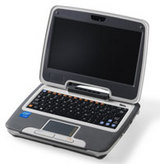
Subnotebook are as relatively new development in the personal computer market that is the result of industry development to bring computers to developing countries. Projects such as the XO and Intel's Classmate looked at producing extremely cost effective computers that could still handle basic computing tasks so they could be sold in large quantities to governments for use in schools. Both the companies developing such systems and the general public saw this systems and their potential as highly portable computers with network access.
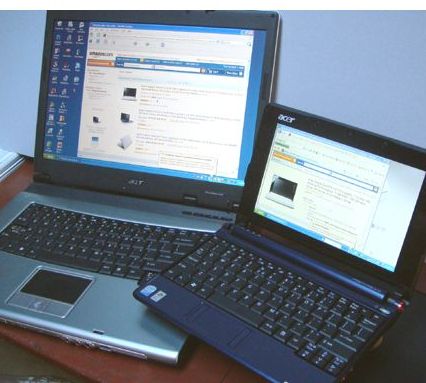
The Acer netbook or subnotebook on the right sports an 8.9" screen compared to 15" on its big brother to the left. Subnotebooks sacrifice keyboard and screen size for portability.
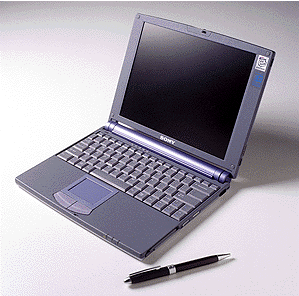
In 1998, Sony popularized the subnotebook class with its VAIO (pronounced "vy-o") 505G at three pounds and less than an inch thick. To reduce traveling weight, floppy and CD-ROM drives were external, and a docking station was included. (Image courtesy of Sony Corporation.)
To achieve the size and weight reductions, ultraportables use high resolution 13" and smaller screens (down to 6.4"), have relatively few ports, employ expensive components designed for minimal size and best power efficiency, and utilize advanced materials and construction methods. Some subnotebooks achieve a further portability improvement by omitting an optical/removable media drive; in this case they may be paired with a docking station that contains the drive and optionally more ports or an additional battery.
The term "subnotebook" is usually reserved to laptops that run general-purpose desktop operating systems such as Windows, Linux or Mac OS X, rather than specialized software such as Windows CE, Palm OS or Internet Tablet OS.

Sizes (smallest to largest):Nintendo DS Lite (handheld), Asus Eee PC (netbook) and MacBook(laptop)
Most subnotebooks are not what you would consider fast when it comes to computers. They are not designed for fast speeds but more for power efficiency. They need enough processor performance to handle basic computing tasks such as web browsing, email, word processing, spreadsheets and basic photo editing. This is where they tend to get the nicknames as network devices or mobility platforms. Frankly, you don't need much computing power to do these tasks. As such, subnotebooks tend to use older mobile parts or newly designed low wattage parts such as Intel's Atom processor.
Where's The CD?
Since their computing tasks are limited and costs are a key factor, the number of features in a subnotebook is less than you would find in a traditional laptop or even an ultraportable. Items such as CD/DVD drives are not required and only add to the cost an bulk of the system. By removing features like this, they can reduce the weight, size and power consumption. As a result, most people will not be able to use a subnotebook as a complete PC replacement without adding additional peripherals such as a external drives.
Solid State or Hard Drive?
Speaking of drives, many of the early subnotebooks decided to use flash or solid state drives in lieu of a traditional hard drive. This one again reduces the overall size of the system and reduces power consumption. The problem is that the memory chips used for solid state drives are extremely expensive. This results in limited storage space (sometimes not even enough to hold Windows XP) or rapid increases in the cost of the system compared to a standard notebook. Because of this, most of the recently announced subnotebooks have opted to use traditional notebook drives instead of flash memory.
Software
Software is another big item when talking about subnotebooks. Windows Vista is generally too resource intensive to support the hardware. Microsoft had planned to phase out support and sales of Windows XP that could run on the systems. This along with the base costs of the Microsoft software led many of the manufacturers to turn to open source software such as Linux and OpenOffice as a means of running the systems. This helped reduce costs but has some compatibility issues for consumers and governments.
Microsoft made some recent announcements that are set to change the subnotebook market. They have pledged to continue selling Windows XP for subnotebook uses only and at discounted prices. This means manufacturers of subnotebooks can bundle Windows XP for those that require it past Microsoft's original end of life date. In order for XP to be allowed for sale though, there are hardware restrictions on the subnotebooks such as the processor speed or the amount of RAM.
Display and Size
LCD displays are probably the biggest overall cost to manufacturers of laptop PCs. In order to reduce the overall costs of these systems, the manufacturers developed systems using smaller screens. Ultraportable systems tend to use 11 to 13-inch displays while subnotebooks use screens anywhere from 7 to 10-inches in size. This reduces the cost of the display and has the benefit or producing a smaller overall system. The downside is that the smaller screens have much more limited resolution making them more difficult to use for some tasks.
With subnotebooks being smaller than ultraportables, they also tend to be much lighter. This makes them great for those that need to have network connectivity while they are traveling or basic productivity computing. The small size does have its drawbacks though. Subnotebooks tend to be very narrow forcing the keyboard to also be smaller than a traditional notebook design. These small keys can be very problematic for use over extended periods of time or for those with larger hands.
Costs
The goal of these subnotebooks was to be less expensive than a traditional notebook PC. This is true for some of these models, but many subnotebooks have expanded features or items that have driven their costs up. What were announced as systems ranging in price from $100 to $400 have quickly escalated to be between $300 and $800 depending upon configurations. This puts many of these subnotebooks directly in competition price wise with full features budget notebooks. Of course, a budget notebook is larger so it really comes down to a question of size versus features.
Conclusions
Subnotebooks offer up some great values in the computing world as well as extremely mobile computing platforms. The problem is that they fail in most aspects of having all the standard features of a traditional laptop computer. This makes them a good choice for supplementing a desktop PC for those that don't want to buy a full notebook for traveling away from the office or home. They are very good as network appliances for web browsing or accessing email.
Now Read the history
desktop replacement laptop
Sunday, June 14, 2009The largest and heaviest type of laptop, desktop replacements are designed to deliver the power and features you'd get from a desktop PC. Too bulky for anything but room-to-room travel within a house or an office, desktop replacements typically offer the best performance, the largest screens and keyboards, and the most complete set of features available on a laptop. Popular among home and business users, these systems can deliver enough computing muscle for serious gaming, multimedia authoring, and even high-level digital audio and video work.
In brief-
A desktop computer is difficult to carry or remove.There are severel separate parts-monitor,Keyboard,Ups-are connected with CPU box that contains Motherboard,processor,Ram,Hard disk.--To carry or to remove desktop computer you have to disconnect monitor,Keyboard,Ups from CPU box and carry them separately .
But a notebook pc or laptop computer is easy to carry with its less weight (2 to 3kg)& smaller size& consume less power.Also it can run on rechargeble battery that provide power to run your laptop for 3 to 12 hours(model depended).
As notebook pc or laptop computer is advantegious in regard of portability and smaller size,it has to sacrifice some computing power,in simple word you can't expect high gaming,graphics,processing performance in laptop just like desktop computer.
But what if we don't need much portability.We can consider some weight and size and get a computer that is the combination of desktop and laptop.Thus it can perform just like a desktop computer and more or less it is portable-with more weight and bigger size than typpical thin laptop.
-----This type of laptop computer is called DESKNOTE computer.
Now I have collected some related articles from websites.You can go through them for detail-
A desktop replacement computer (dtr) is a personal computer that provides the full capabilities of a desktop computer while remaining mobile. They are often larger, bulkier laptops. Because of their increased size, this class of computer usually includes more powerful components and a larger display than generally used in smaller portable computers and can have a relatively limited battery capacity (or none at all). Some use a limited range of desktop components to provide better performance at the expense of battery life. These are sometimes calleddesknotes, a portmanteau of the words "desktop" and "notebook," though the term is also applied to desktop replacement computers in general.
Origins
The forerunners of the desktop replacement were the portable computers of the early-to-mid 1980s, such as the Osborne I, the Compaq Portable and the Commodore Executive 64 (SX-64) computers. These computers contained the CPU, display, floppy disk drive and power supply all in a single briefcase-like enclosure. Similar in performance to the desktop computers of the era, they were easily transported and came with an attached keyboard that doubled as a protective cover when not in use. They could be used wherever space and an electrical outlet were available, as they had no battery.
The development of the laptop form factor gave new impetus to portable computer development. Many early laptops were feature-limited in the interest of portability, requiring such mobility-limiting accessories as external floppy drives or clip-on trackball pointing devices. The first laptop that could be used as an only computer was the PowerBook 500 series, with its built in ethernet, video, SCSI, ADB and serial ports, it duplicated the functionality of the desktop models.
The development of the modern desktop replacement computer came with the realization that many laptops were used in a semi-permanent location, often remaining connected to an external power source at all times. This suggested that a market existed for a laptop-style computer that would take advantage of the user's reduced need for portability, allowing for higher-performance components, greater expandability, and higher-quality displays. Desktop replacement computers are also often used with a docking station, to fully enjoy the desktop comfort.
Design features
Modern desktop replacements generally perform better than traditional laptop-style computers as their size allows the inclusion of more powerful components. The larger body means more efficient heat-dissipation, allowing manufacturers to use components that would otherwise overheat during normal use. Furthermore, their increased size allows for greater expandability and features, as well as larger and brighter displays. However, these advantages generally come at a price premium, with many computers in this class costing as much as two desktop computers with similar specifications.
Using a laptop form factor, however, desktop replacements still often suffer from limitations similar to those of more mobile laptops. They usually lack the ability to accept standard PCIexpansion cards, limiting their expandability somewhat. While the computers can offer slightly better cooling than other laptops, they rarely dissipate heat efficiently enough to allow for high-end desktop-class components, and thus may not reach the same performance levels as desktop computers.
Desktop replacement computers are, with a few exceptions, difficult to upgrade compared to desktop computers, with many of their major components (such as the display) integral to the design of the machine, and others (such as the CPU and GPU) often being hard to access and replace. A small segment of desktop replacements do not include a battery as a standard feature, while some do not include PC-Card support. They have the same limitations on serviceability as laptops, and can rarely use identical components to a desktop computer.

